AI job application automation, from search to submit
Aupply automates the job application from search to submit, with AI doing the parts that take the time: finding jobs that fit your resume, reading each job description, filling in the form, writing the answers and rewriting your resume for the job.
It is one browser extension for the whole job search: LinkedIn, Naukri and Wellfound applications go out by themselves, 50+ other job sites get filled for you to submit, and every application lands in one tracker.
What AI job application automation means in Aupply
Applying to a job has four slow parts: finding it, deciding if it fits, filling in the form and keeping track of it. Aupply takes each one off your hands without taking you out of the loop.
- Finding: on LinkedIn, Naukri and Wellfound, Aupply searches for recent jobs in the titles and countries you chose.
- Deciding: an AI reads each job description and scores it against your resume. Jobs in places you ruled out, with a stack you excluded, asking for far more years than you have, or paying below your minimum are skipped.
- Filling: on LinkedIn Easy Apply, Naukri and Wellfound the form is filled and submitted for you. On Workday, Greenhouse, Lever and 50+ other sites, Autofill fills the form and you press Submit.
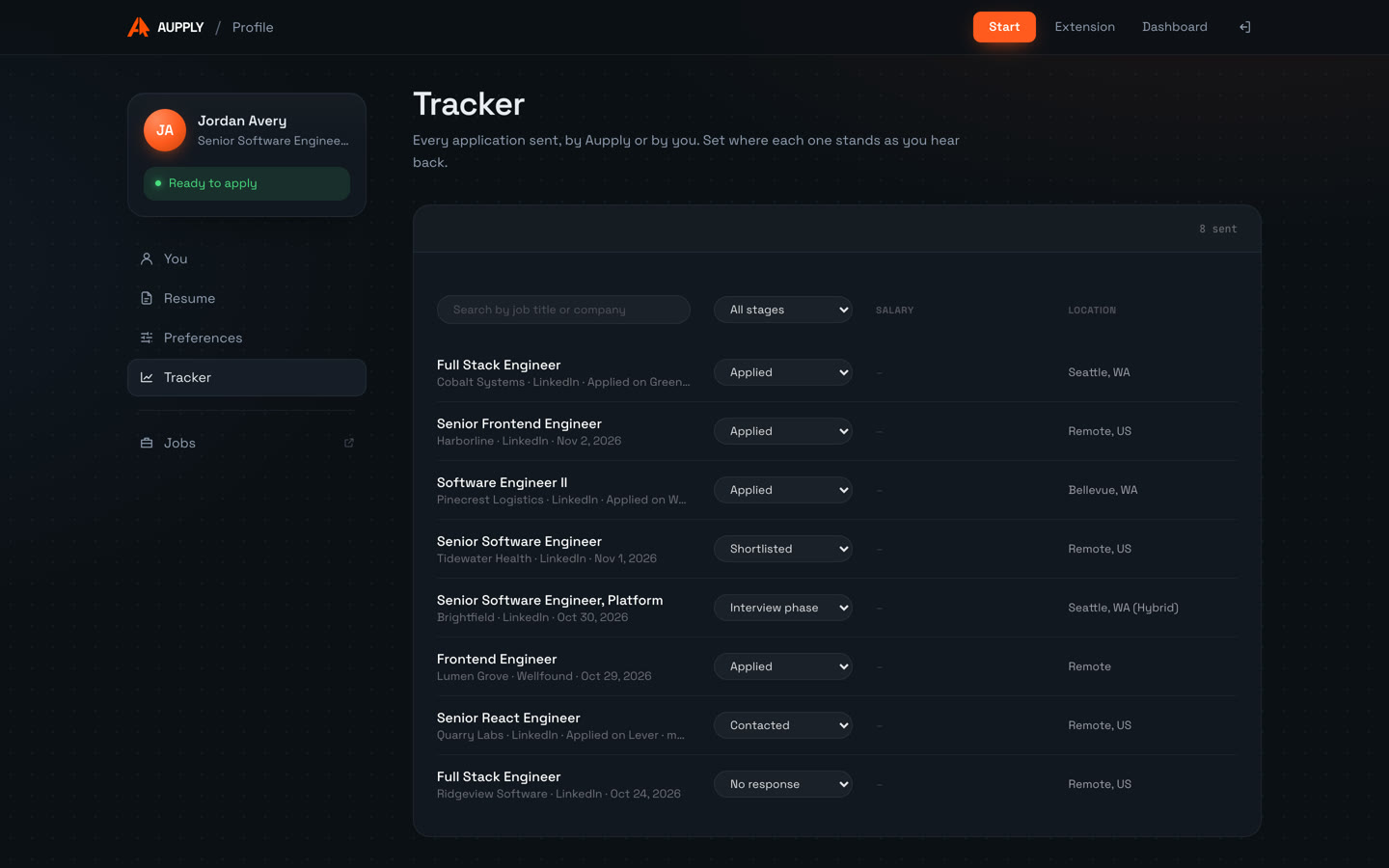
- Tracking: every application, from any of these, is listed in one tracker with the stage you set.
Where the AI answers and where you do
Screening questions are answered from your profile and saved answers first, then by AI from your resume. Personal facts such as notice period, pay, work authorization and sponsorship are never made up: Aupply asks you once, saves the answer and reuses it on every later application.
Longer written answers, like "Why are you interested in this role?", are written by AI from your resume and the job, and marked for you to read before you submit.
Resumes written for each job
With Rewrite resume ticked, Autofill rewords your resume toward the job's requirements before it goes into the form. Employers, titles and dates stay exactly as they are. Every tailored version is kept in your profile with the changed lines shown.
How it compares with other AI job application tools
Most tools do one of these jobs: an autofill extension, a resume writer, a tracker, or an auto-apply bot for one site. Aupply does all four in one extension and one profile, runs in your own browser instead of a remote server, and applies at a person's pace instead of in bulk.
See it work
- 01
Open the application
On a supported job site, Aupply shows Auto-fill this application, with a Rewrite resume box beside it.
- 02
Press Autofill
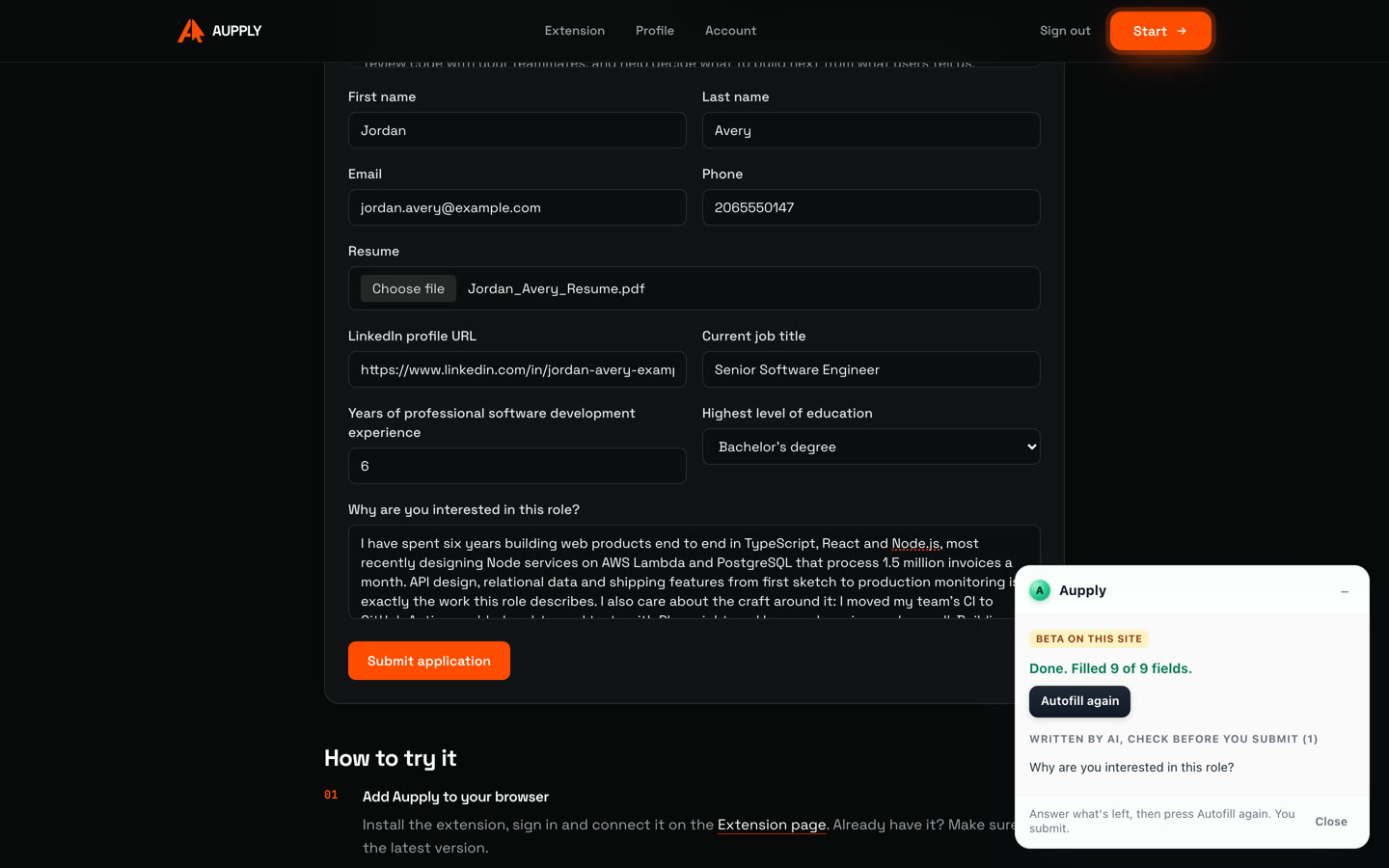
Aupply reads the form and the job, attaches your resume and fills name, contact details, links, title, years and education.
- 03
AI writes the long answer
"Why are you interested in this role?" is written from your resume and the job, and marked for you to check.
- 04
You submit
The panel says how many fields were filled. You read the form and press Submit. The application goes to your tracker.
Recorded in real time on Aupply's own sample job, with a made-up profile. Try it there yourself.
Screenshots
Supported platforms
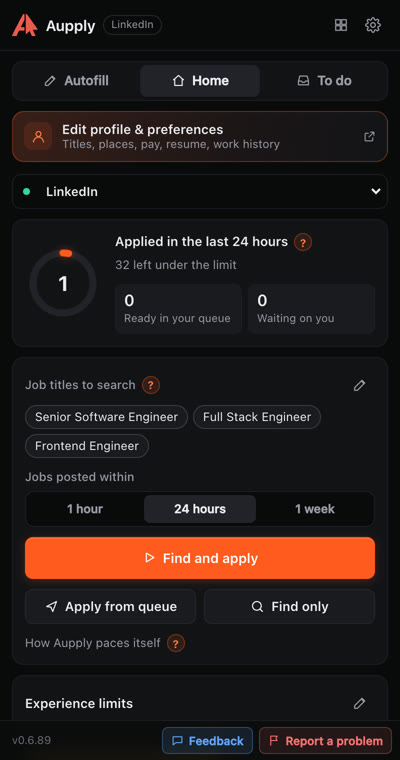
Finds Easy Apply jobs that fit you and applies to them for you.
Naukri (beta)
Refreshes your profile, finds jobs in India and applies, answering the recruiter's questions.
Wellfound (beta)
Finds startup jobs that fit you and applies, answering each company's questions.
Autofill fills the application, and you submit, on 52 sites:
- Workday
- Greenhouse
- Lever
- Ashby
- iCIMS
- Taleo
- SAP SuccessFactors
- Oracle Recruiting Cloud
- Workable
- BambooHR
- Rippling
- Jobvite
- Avature
- BrassRing
- Dayforce
- Paylocity
- Phenom
- Eightfold
- Teamtailor
- Recruitee
- JazzHR
- Breezy HR
- Pinpoint
- Comeet
- Dover
- Freshteam
- Gusto
- Homerun
- JobScore
- Polymer
- TriNet Hire
- GovernmentJobs
- Oleeo
- Amazon
- Apple
- Meta
- IBM
- Uber
- Tesla
- Netflix
- TikTok
- ByteDance
- Roblox
- Waymo
- Okta
- Cursor
- Mechanize
- Indeed
- SEEK
- Naukri
- Wellfound
In Chrome, Edge, Brave and other Chromium browsers on a computer.
Honest limitations
- Applying by itself works on LinkedIn Easy Apply, Naukri (beta) and Wellfound (beta). Everywhere else Autofill fills the form and you submit.
- Desktop Chromium browsers only, not phones.
- Aupply does not promise interviews or offers.
More in the FAQ and on how Aupply works.
AI job application: questions
What is AI job application automation?
Software that uses AI to find jobs, judge whether they fit you, fill in the application and track it. Aupply does this in your own browser: it applies by itself on LinkedIn Easy Apply, Naukri and Wellfound, autofills 50+ other job sites, rewrites your resume for each job and keeps every application in one tracker.
Does the AI make up answers about me?
No. Personal facts such as notice period, pay, work authorization and visa sponsorship come only from you. Aupply asks once, saves the answer and reuses it. AI answers the other questions from your resume, and long written answers are marked for you to check.
Which job sites does Aupply automate?
It applies by itself on LinkedIn Easy Apply, Naukri and Wellfound (the last two in beta). Autofill fills applications on 50+ sites including Workday, Greenhouse, Lever, Ashby, iCIMS, Taleo, SAP SuccessFactors, Indeed and SEEK, and you submit.
Is it free?
Aupply is free during early access, with no card needed. It installs from the Chrome Web Store.
Install Aupply
Aupply is an AI browser extension for job applications, for Chrome, Edge, Brave and other Chromium browsers. Its Autofill fills in application forms on 50+ job sites, such as Workday, Greenhouse and Lever, from your profile; you check the form and submit. It can rewrite your resume for each job, toward the job's requirements, keeping your employers, titles and dates as they are. On LinkedIn it goes further: it finds recent Easy Apply jobs that fit your resume and applies to them for you, at a person's pace with breaks. 500 applications a day. It also applies on Naukri, where it keeps your profile freshly updated, and on Wellfound (both in beta), and records every application in one tracker. When a form asks for a personal fact it does not have, it asks you once and remembers the answer. Aupply is used by 150+ job seekers and is free during early access, with no card needed.
Related
- Job search automationAutomate your job search: Aupply searches LinkedIn, Naukri and Wellfound for jobs that fit your resume, applies at a person's pace and tracks it all. Free.
- AI job application agentWhat an AI job application agent does, how it differs from resume tools, job boards, autofill extensions and auto-apply bots, and what Aupply can and cannot do.
- Job application autofillAupply autofills job applications on Workday, Greenhouse, Lever and 50+ sites: work history, screening questions and AI answers. You submit. Free.
- AI resume tailoringAupply tailors your resume to each job as it fills the application, keeping employers, titles and dates as they are. Every change shown. Free.