Job application autofill extension that fills the whole form
Aupply is a job application autofill extension that fills the whole form, not just your name and email: work history, education, links, dropdowns, screening questions and the longer answers, written for the job by AI.
It works on 50+ job sites, including Workday, Greenhouse, Lever, Ashby, iCIMS and Taleo, in Chrome, Edge and Brave. You watch it fill, check the form and press Submit.
How it works
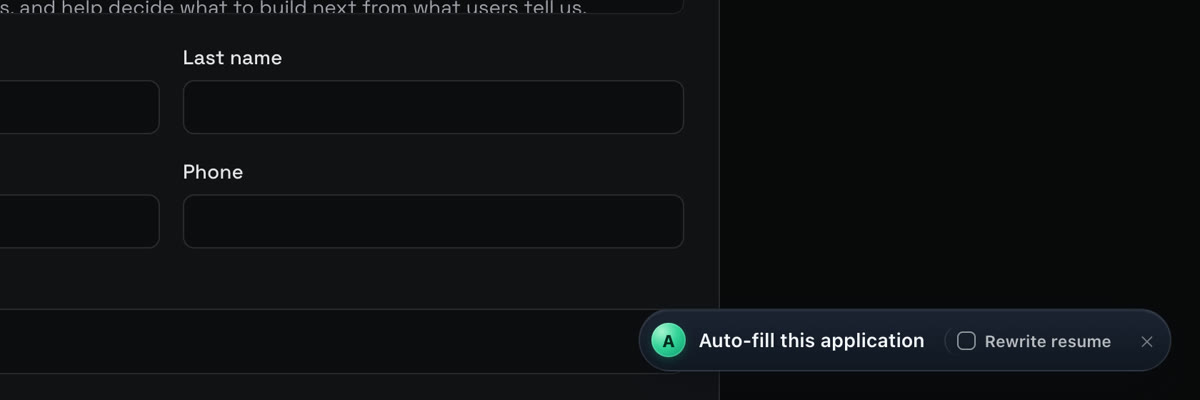
- Open a job application on a supported site. Aupply shows an Auto-fill this application button.
- Press it. Aupply reads the form and fills every field it can from your profile and saved answers.
- Questions it has no answer for are answered by AI from your resume; long answers are marked for you to check.
- Personal facts it does not have are left for you and saved once you answer them, so the next form gets them.
- On a form with several steps, each new step fills as you reach it. You check and submit.
What it fills
Text boxes, numbers, dates, dropdowns, searchable lists, radio buttons and checkboxes, your resume file, repeated work and education sections, the standard veteran, disability and diversity questions from the answers you saved, and written answers like "Why do you want to work here?".
A resume tailored for each job
Tick Rewrite resume before you press the button and Aupply rewords your resume toward the job's requirements, then uploads that version into the form. Your employers, titles and dates are kept as they are.
Autofill from LinkedIn
On a LinkedIn job that sends you to a company site Aupply supports, an Autofill with Aupply button appears beside LinkedIn's Apply. Press it and the company's form opens and fills by itself.
See it work
- 01
Open the application
On a supported job site, Aupply shows Auto-fill this application, with a Rewrite resume box beside it.
- 02
Press Autofill
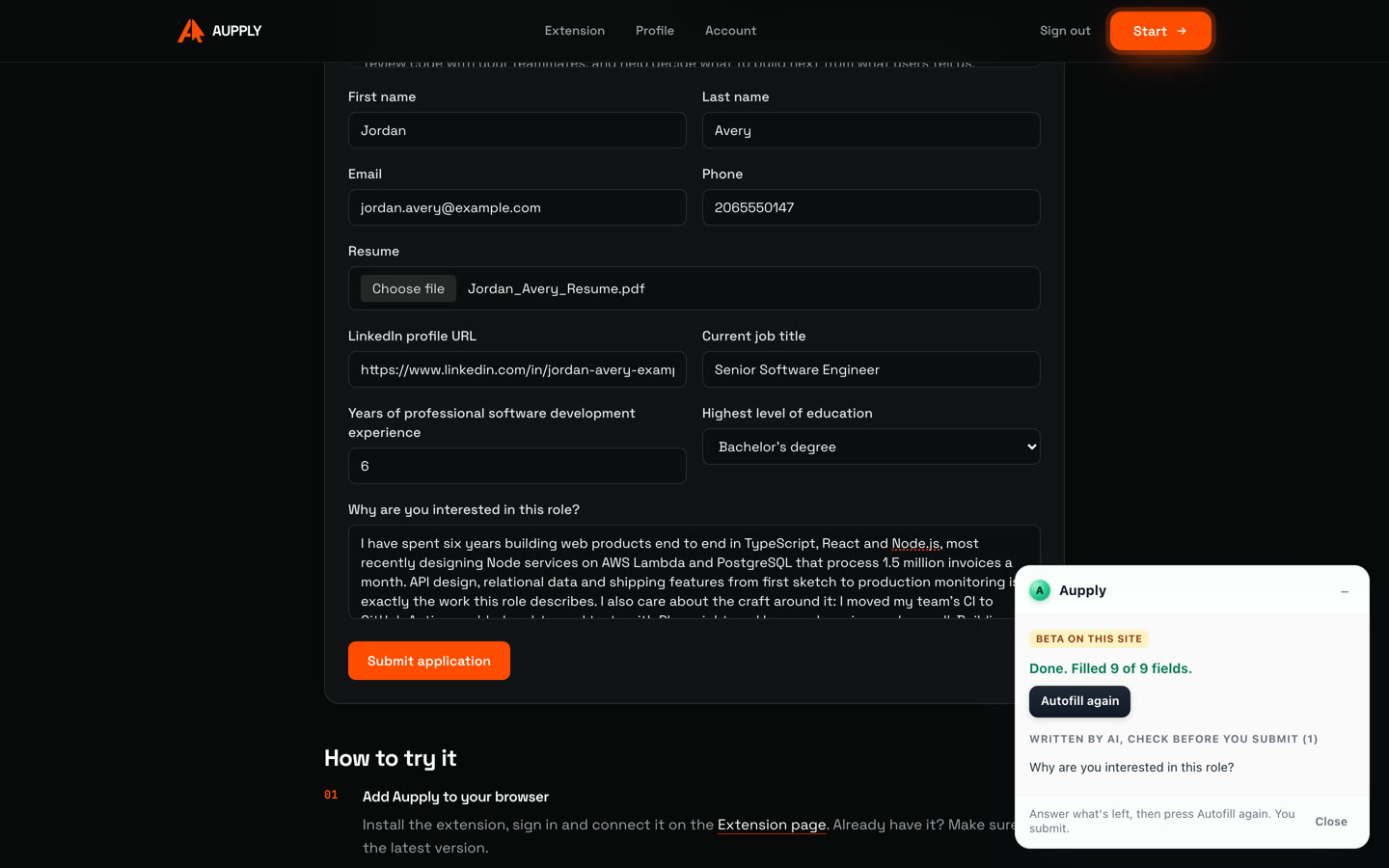
Aupply reads the form and the job, attaches your resume and fills name, contact details, links, title, years and education.
- 03
AI writes the long answer
"Why are you interested in this role?" is written from your resume and the job, and marked for you to check.
- 04
You submit
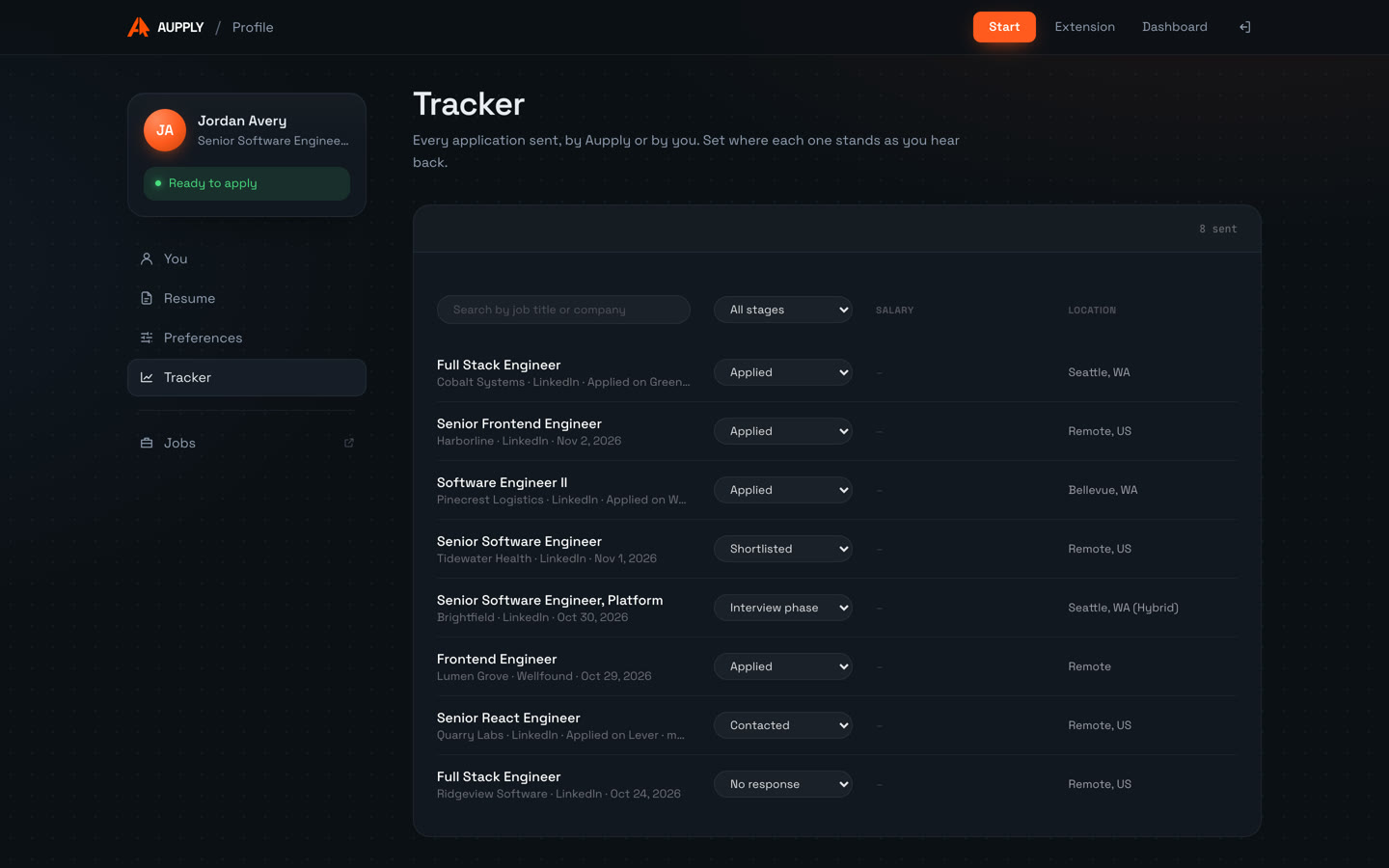
The panel says how many fields were filled. You read the form and press Submit. The application goes to your tracker.
Recorded in real time on Aupply's own sample job, with a made-up profile. Try it there yourself.
Screenshots
Supported platforms
Finds Easy Apply jobs that fit you and applies to them for you.
Naukri (beta)
Refreshes your profile, finds jobs in India and applies, answering the recruiter's questions.
Wellfound (beta)
Finds startup jobs that fit you and applies, answering each company's questions.
Autofill fills the application, and you submit, on 52 sites:
- Workday
- Greenhouse
- Lever
- Ashby
- iCIMS
- Taleo
- SAP SuccessFactors
- Oracle Recruiting Cloud
- Workable
- BambooHR
- Rippling
- Jobvite
- Avature
- BrassRing
- Dayforce
- Paylocity
- Phenom
- Eightfold
- Teamtailor
- Recruitee
- JazzHR
- Breezy HR
- Pinpoint
- Comeet
- Dover
- Freshteam
- Gusto
- Homerun
- JobScore
- Polymer
- TriNet Hire
- GovernmentJobs
- Oleeo
- Amazon
- Apple
- Meta
- IBM
- Uber
- Tesla
- Netflix
- TikTok
- ByteDance
- Roblox
- Waymo
- Okta
- Cursor
- Mechanize
- Indeed
- SEEK
- Naukri
- Wellfound
In Chrome, Edge, Brave and other Chromium browsers on a computer.
Honest limitations
- Autofill never presses Submit on these sites: you do.
- If a site asks you to sign in or create an account before the form, you do that part, and Autofill fills the form once it is on screen.
- It fills supported sites only. Every supported site is in beta and gets better each week.
- Desktop Chromium browsers only, not phones.
More in the FAQ and on how Aupply works.
Job application autofill: questions
What is the best job application autofill extension?
Look for one that fills the whole form, not just contact details, and works on the applicant tracking systems employers use. Aupply fills work history, education, dropdowns, screening questions and AI-written answers on 50+ sites including Workday, Greenhouse, Lever, Ashby, iCIMS and Taleo, can tailor your resume for each job, and records every submission in a tracker. It is free during early access.
Does Aupply submit the application for me?
Not on these sites. Autofill fills the form while you watch and you press Submit yourself. Aupply applies by itself only on LinkedIn Easy Apply, Naukri and Wellfound.
Which browsers does it work in?
Chrome, Edge, Brave and other Chromium browsers on a computer. It does not run on phones.
Does it work on Workday and Greenhouse?
Yes. Workday, Greenhouse, Lever, Ashby, iCIMS, Taleo, SAP SuccessFactors, Oracle Recruiting Cloud, Workable, BambooHR, Rippling, Jobvite, the career sites of Google, Amazon, Apple, Meta and more are supported. The full list is on this page.
Install Aupply
Aupply is an AI browser extension for job applications, for Chrome, Edge, Brave and other Chromium browsers. Its Autofill fills in application forms on 50+ job sites, such as Workday, Greenhouse and Lever, from your profile; you check the form and submit. It can rewrite your resume for each job, toward the job's requirements, keeping your employers, titles and dates as they are. On LinkedIn it goes further: it finds recent Easy Apply jobs that fit your resume and applies to them for you, at a person's pace with breaks. 500 applications a day. It also applies on Naukri, where it keeps your profile freshly updated, and on Wellfound (both in beta), and records every application in one tracker. When a form asks for a personal fact it does not have, it asks you once and remembers the answer. Aupply is used by 150+ job seekers and is free during early access, with no card needed.
Related
- Workday autofillAutofill Workday job applications step by step: My Information, My Experience, Application Questions and Self Identify, from your profile. Free in Chrome.
- AI resume tailoringAupply tailors your resume to each job as it fills the application, keeping employers, titles and dates as they are. Every change shown. Free.
- AutofillAutofill job applications on Workday, Greenhouse, Lever and 50+ sites from your profile, with a resume rewritten for each job. Works in Chrome, Edge and Brave.
- Job application trackerA job application tracker that fills itself: every application Aupply sends or Autofill submits on 50+ sites is recorded, with stages you set. Free.